---
title: How do I add my certificate to LinkedIn?
description: Showcase your EntryLevel certificate on LinkedIn to boost credibility. Follow simple steps to add it under ‘Licenses & Certifications’ on your profile.
---
[Skip to content](https://help.startwithhex.com/knowledge-base/how-do-i-add-my-certificate-to-linkedin-entrylevel-help-centre#main-content)
English
Show submenu for translations
[](https://startwithhex.com)
Open main navigation
Close main navigation
- English
Show submenu for translations
- [Contact us](mailto:help@startwithhex.com)
[Contact us](mailto:help@startwithhex.com)
How can we help you?
- There are no suggestions because the search field is empty.
1. [Help Center](https://help.startwithhex.com/knowledge-base?hsLang=en)
2. [EntryLevel FAQs](https://help.startwithhex.com/knowledge-base/entrylevel-faqs?hsLang=en)
3. [Certificates & Perks](https://help.startwithhex.com/knowledge-base/entrylevel-faqs?hsLang=en#certificates-perks)
April 12, 2025
# How do I add my certificate to LinkedIn?
Congratulations on completing an EntryLevel program and earning your certificate! Showcasing this achievement on your LinkedIn profile not only highlights your new skills to potential employers and recruiters but also enhances your professional credibility.
[](https://downloads.intercomcdn.com/i/o/1029765423/03a12d9e4b02d91c99bc49e8/image.png?expires=1744352100&signature=df1447ca65a1789bfd8199c20b9347c14fc55bbac3201ffb9922f89b2a04a335&req=dSAlH854mIVdWvMW1HO4zavLxzrqD11%2B%2FmxkytNTOJV9pd0NAqsHX4SbXY6a%0AYsQbezpCewXNwrfJpYY%3D%0A)
### Here’s a simple guide to help you add your EntryLevel certificate to your LinkedIn profile:
1. **Access Your Profile:**
- Click on the ‘Me’ icon at the top right of your LinkedIn homepage.
- Select ‘View Profile’ from the dropdown menu.
2. **Add Your Certificate:**
- On your profile page, click ‘Add Profile Section’.
- Under the ‘Recommended’ dropdown, choose ‘Licenses & Certifications’.
3. **Enter Certificate Details:**
- In the popup form, fill out the details of your certification:
- **Name**: Enter the exact name of the program you completed (e.g., Data Analyst).
- **Issuing Organization**: Type ‘EntryLevel’ to ensure our logo appears next to your certificate on your profile.
- **Issue Date**: Select the month and year you received your certificate.
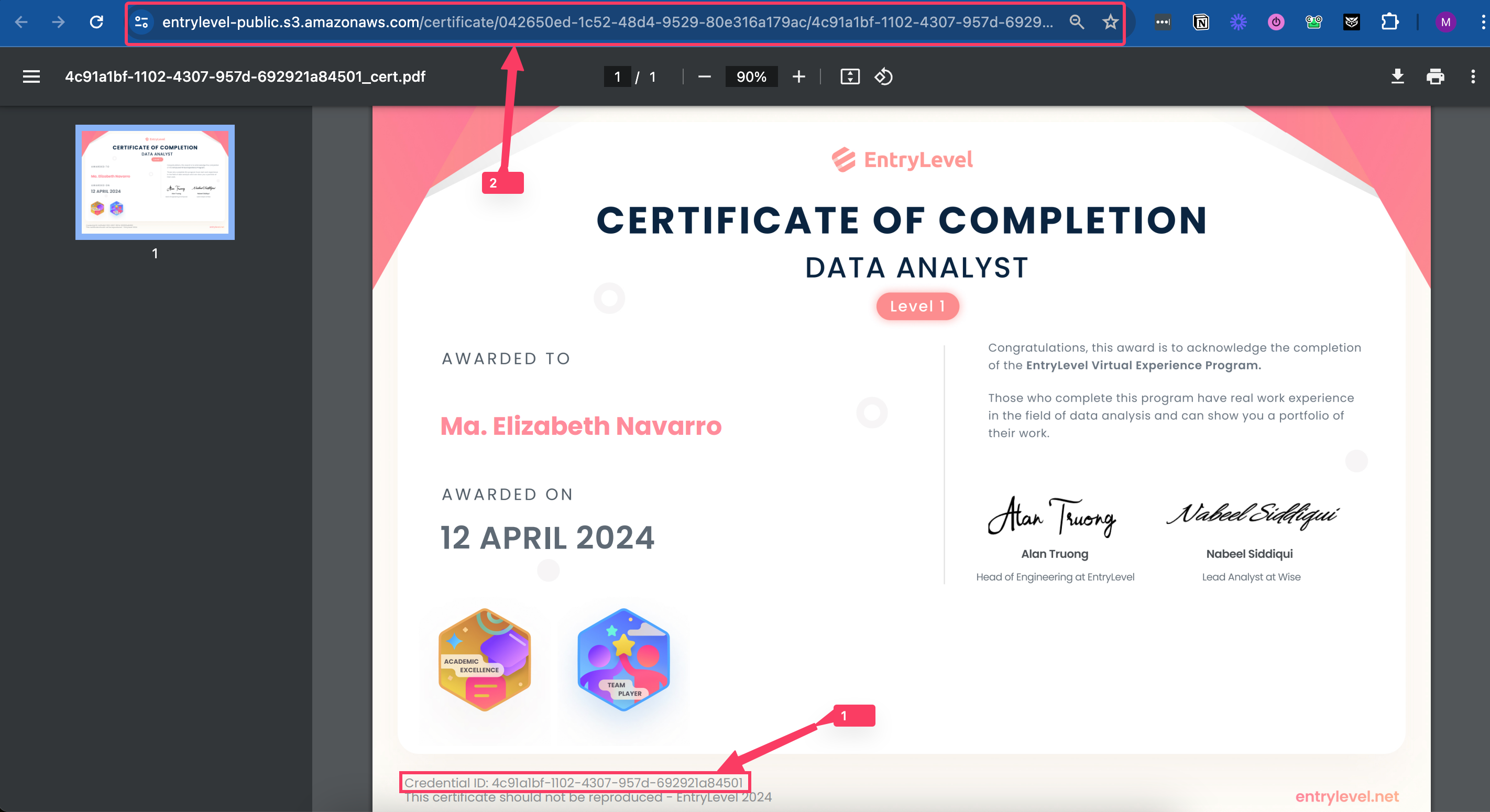
- **Credential ID**: Include the ID found at the bottom of your certificate.
- **Credential URL**: Navigate to your certificate on your learning platform, open it, and copy the URL from the address bar. If you encounter an error when opening this link in a new tab, try copying the URL again, ensuring it starts with ‘[https://entrylevel.net…’](https://help.startwithhex.com/knowledge-base/how-do-i-add-my-certificate-to-linkedin-entrylevel-help-centre?hsLang=en)
- Ensure the ‘This credential does not expire’ box is checked.
4. **Save and Share:**
- Click ‘Save’ to add the certificate to your LinkedIn profile.
5. **Repeat if Necessary:**
- If you have additional certifications to add, repeat the steps above for each one.
**Adding your certificate to LinkedIn not only validates your learning journey but also signals to the world that you’re ready for new professional challenges.**
**Happy networking!**
- [EntryLevel FAQs](https://help.startwithhex.com/knowledge-base/entrylevel-faqs?hsLang=en#main-content)
- [Our Programs](https://help.startwithhex.com/knowledge-base/entrylevel-faqs?hsLang=en#our-programs)
- [Course Schedule and Deadlines](https://help.startwithhex.com/knowledge-base/entrylevel-faqs?hsLang=en#course-schedule-and-deadlines)
- [About Us](https://help.startwithhex.com/knowledge-base/entrylevel-faqs?hsLang=en#about-us)
- [Certificates & Perks](https://help.startwithhex.com/knowledge-base/entrylevel-faqs?hsLang=en#certificates-perks)
- [Payment](https://help.startwithhex.com/knowledge-base/entrylevel-faqs?hsLang=en#payment)
- [In Program Support](https://help.startwithhex.com/knowledge-base/entrylevel-faqs?hsLang=en#in-program-support)
- [Technical](https://help.startwithhex.com/knowledge-base/entrylevel-faqs?hsLang=en#technical)
[](http://www.startwithhex.com)
[mailto:email@email.com](mailto:email@email.com)
Copyright © 2025, HEX